
November 21, 2026
A day focused on drivers' money: Settlements now work by period, with a statement and payment recording, and every wallet movement shows the ride it came from. In Zones, you can now draw circles and rings around a central point.
New
Settlements by period, with a driver statement and «Mark as paid»
Settlements are no longer just a balance: pick a period («This week», «This month», «Last month» or From / To dates) and see, per driver, what was «Earned in period», what is still «To pay» and what has already been paid. The «Only to pay» filter keeps only drivers with open amounts, and «Export CSV» takes the list to your accountant.
Opening a driver shows the period Statement: cards for earnings, adjustments and payments, the «Internal profitability» (revenue, cost and margin) and the list of services with the status of each one — «Paid», «Partial» or «To pay» — and a link to the booking. Earnings are split between «Company car» and «Own car», depending on the vehicle used for each ride, and the statement can be filtered by that split.
To pay, use «Mark as paid»: choose «Full» or «Partial», the method (bank transfer, cash or other), an «Internal note» and, optionally, a «Receipt» as a PDF or image. The payment appears in the statement with the receipt at hand. The screen was redesigned for phone (cards), tablet and desktop.
Where: Settlements › (driver) › Statement
Ref. #329, #330, #331
v1.4.722 – v1.4.726
Driver wallet: every movement shows its ride
Each wallet movement now shows the ride it came from — reference (opens the task in Dispatch), route, operator, vehicle and class. The old «Reverse» became the «Actions» menu on each line:
- Edit amount — the original entry is reversed and replaced by a new one with the right amount; a justification is required and the balance is recalculated.
- Remove entry — it no longer counts towards the balance, but stays visible, struck through, with the reason recorded.
- Add internal note — a note in the driver's history, without touching the balance.
- Evidence / Logs — the ride's milestones, the nearest GPS point for each one and the driver's photos and proofs (including no-show proof).
Every correction is recorded in the driver's history: who, when, amount before and after, and why.
Where: Settlements › (driver) › Movements
Ref. #97
v1.4.716
Radius zones: circles and rings around an epicentre
The zone editor has a new Radius mode next to «Draw». Click the map or search a place to set the epicentre, then enter the «Minimum radius» and «Maximum radius» in metres or kilometres. A minimum of 0 gives a circle; a minimum above 0 gives a ring with an empty centre — handy for distance-based fares from the airport or the city centre.
Pricing and address checks respect the empty centre of rings. The same Radius mode is also available in the zone editor of the initial account setup, and the editor is now more compact.
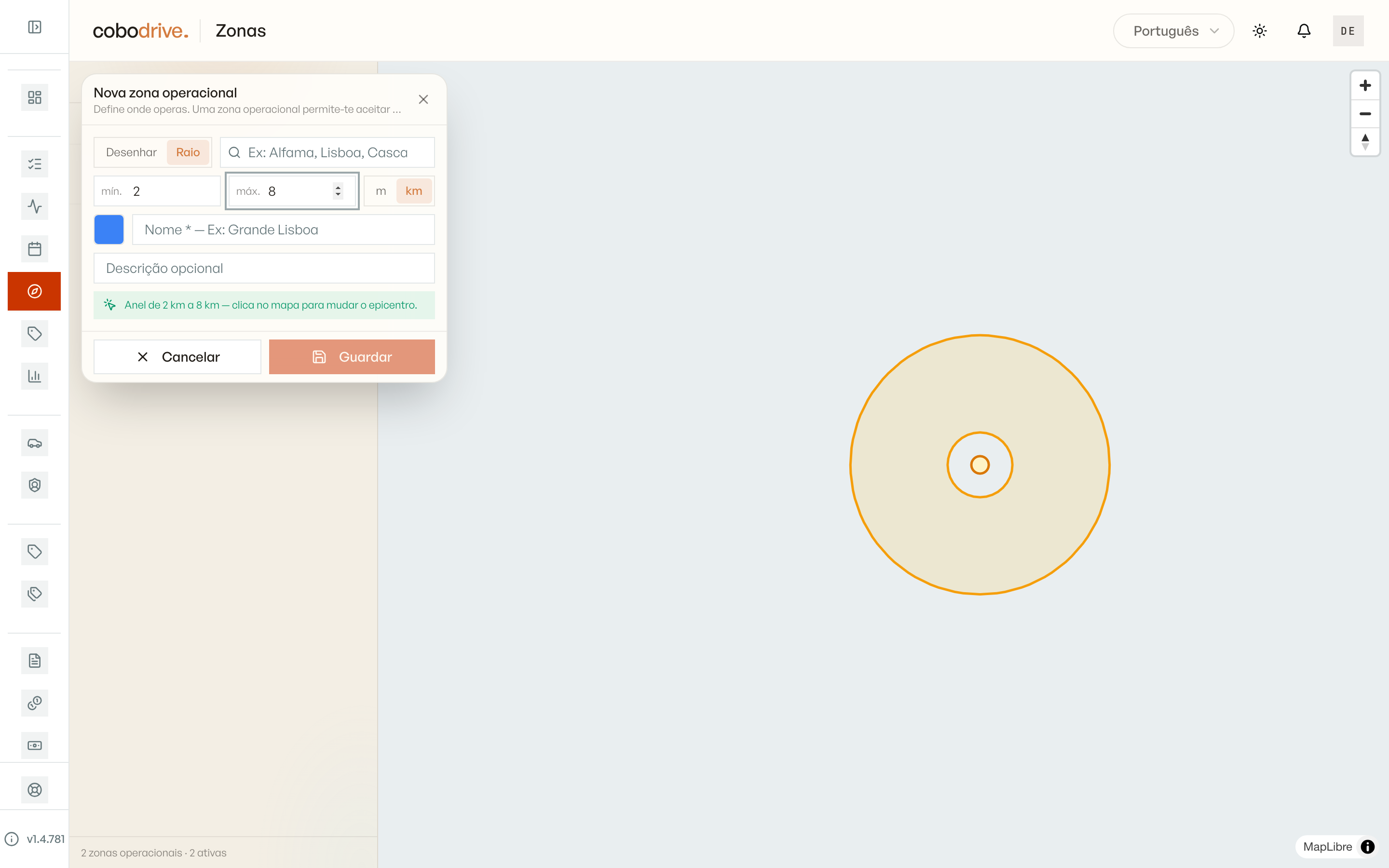
Where: Zones › zone editor › Radius
Ref. #327, #328
v1.4.719 – v1.4.721
Configurable highlights in the driver app
Children on board, child seats and oversized luggage (golf bags, bicycles, skis, surfboards, a folded wheelchair) now stand out in the driver app, on the list card and in the task details. Each highlight can be switched on or off under «Highlights in the app»; when off, the information stays on the task, just without the highlight. All of them are on by default.
For an operator that should differ from the company rule, choose «As in company», «On» or «Off» in the operator's «Driver App» tab.
Where: Settings › Drivers › App › Highlights in the app
Ref. #323
v1.4.716
Improved
Flight history that looks like an arrivals board
A booking's «Flight history» now looks like an airport arrivals board: «Time», «Event» and «Status» columns, a separator per day, changes with the old value struck through and the airport code in the header. It has a light and a dark version, following the theme.
v1.4.717 – v1.4.718
A less intrusive new-version notice in the dashboard
When a new version of cobodrive is out, the «A new version of cobodrive is available…» bar pushes the page down instead of covering the header, shows the countdown moving, and only appears when there really is a new version — not after you reload the page yourself. «Refresh now» is still there.
Ref. #322
v1.4.716
«Time changed» badge in the Tasks list
The «Time changed» badge now has the same format as the other badges in the list, with an icon showing who changed the time: the flight, dispatch or the operator.
v1.4.719
Fixed
Dragging a task from the lower board to a driver shows where it fits
In Dispatch with the two stacked boards, dragging a task from the «no driver» board to the drivers' board now shows the same guidance as the side grid: the rows where the task can go, the «Available» slot, the time line and a warning when the vehicle lacks the requested class, with «Undo».
Where: Dispatch
Ref. #324
v1.4.716
Creating a user with a driver's email
Creating a team user with the email of one of the company's drivers no longer fails: the driver's account also becomes a user, with the chosen roles and the same login (the same email and password already used in the app).
Where: Users
v1.4.727