
November 23, 2026
Today brought «Duplicate task», which saves work on similar bookings. The driver app moved to version 2.16.0, with receipt scanning, and the drivers list shows which app version and phone each driver uses.
New
«Duplicate task»
A booking similar to another one no longer has to be typed from scratch. «Duplicate task» opens the creation panel already filled with the route, time, duration, operator, class, tags, passengers, seats, luggage, customer, special notes, prices and charge items. Adjust what is different and save: you get an independent booking, not linked to the original.
The reference, flight, driver, status, milestones, recorded payments and comments are not copied. Copied prices are kept when the panel opens; they are only recalculated if you change the route or the class.
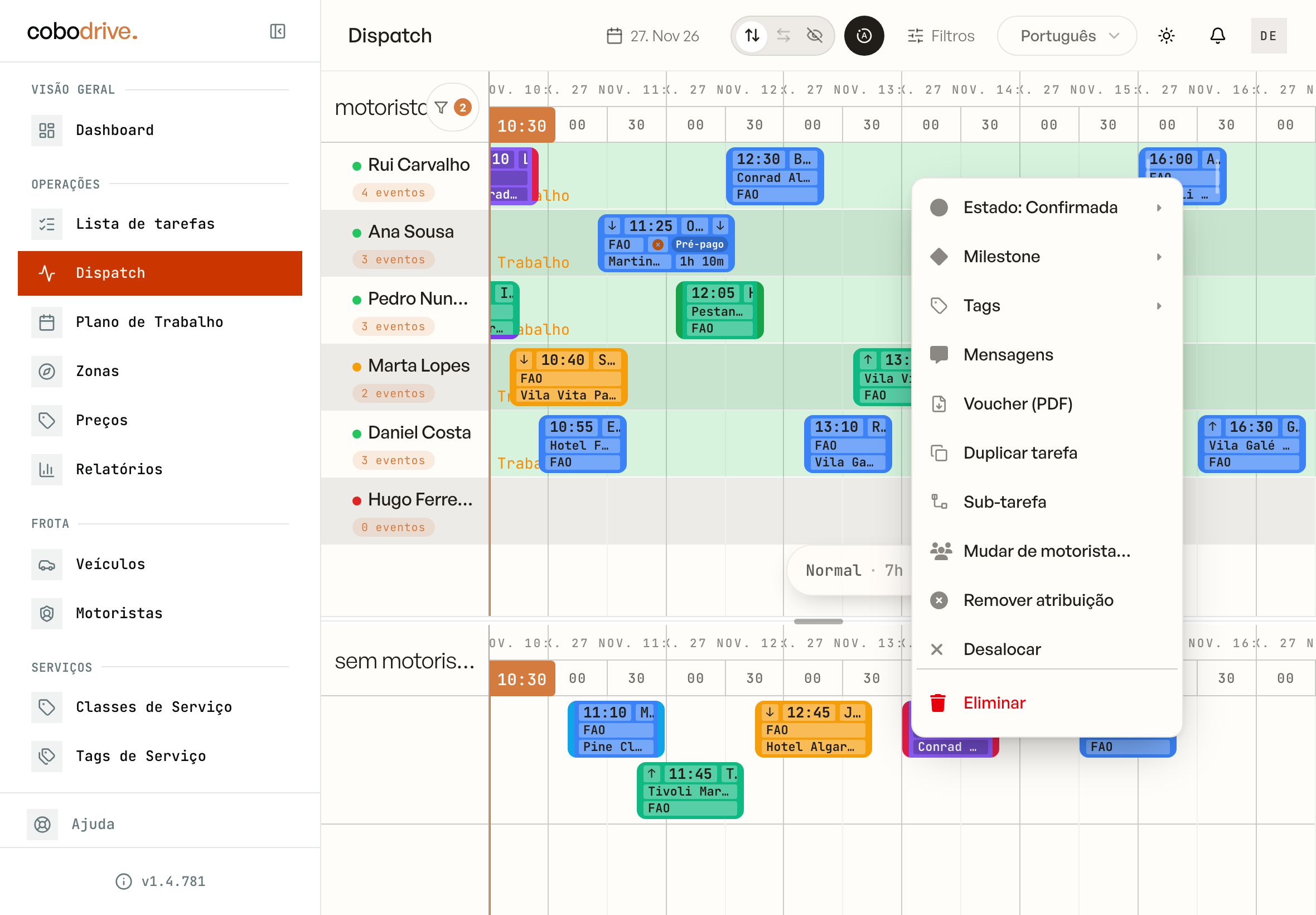
Where: Tasks list › «⋯» · Dispatch › task menu · Dispatch › Tasks list window
Ref. #348
v1.4.749
Driver app 2.16.0: scan the receipt
In a new expense, the «Scan receipt» button opens the phone's document scanner: it finds the sheet by its edges, straightens it and crops the background, and lets you scan several sheets at once. Receipts upload even when they are large; «From gallery» is still there for receipts already on the phone and, if the scanner isn't available, the app uses the normal camera.
This feature needs version 2.16.0 of the app, installed from the store (Google Play or TestFlight).
Where: Driver app › Wallet › Expenses › New expense
Ref. #345
v1.4.745 · app 2.16.0
Each driver's app version and phone
The Drivers list has new «App» and «Phone» columns. «App» shows the installed version and flags «Outdated» when a newer one exists; «Phone» shows the operating system and version (and the model, on Android) and warns about missing permissions — «Location denied», «No background location» or «Notifications denied». Hover for the details. It helps you see quickly why a driver is missing from the map or not getting notifications.
The data arrives when the driver opens the updated app. The list also gained a grid/list switch, «Manage columns» and cards on phones.
Where: Drivers
v1.4.752
Improved
Driver app: required update when the version is too old
When the installed version is no longer supported, the app shows the «Update required» screen with an «Update» button that goes to the store (on iPhone, straight to TestFlight). Before sending the driver to the store, the app tries a quick in-app update. It never interrupts a trip in progress.
v1.4.746 – v1.4.748