
November 22, 2026
Drivers can now record tolls, parking and other expenses in the app, with the receipt, and the office approves them in Settlements. Installing on iPhone got simpler, the Tasks list has a phone version and shifts now always follow the company's time zone.
New
Driver expenses, with a receipt and office approval
In the driver app: under «Wallet» › «Expenses» › «New expense», the driver picks the category, enters the amount, adds at least one photo of the receipt and taps «Submit expense». The expense stays pending — it only counts towards the balance once the office approves it.
In the dashboard: the driver's statement shows «Pending expenses», with the receipt photos. «Approve» adds the amount to the provision balance (once only); «Reject» asks for a reason, which the driver sees in the app. The office can also record an expense directly with «Record an expense».
Categories belong to each company: the «Expense categories» button in Settlements lets you create, rename, reorder and remove categories (expenses already recorded keep the old name). The new permission «Record expenses (with receipt)», in the «Expenses» section of the app roles, is on by default in the Driver role.
Where: Driver app › Wallet › Expenses · Settlements › (driver) › Statement
Ref. #333
v1.4.734
iPhone: install the app through the public TestFlight link
The iPhone driver app no longer needs an invitation: it installs through the public TestFlight link. The driver emails (invitation, account ready, driver access), the account-ready screen and the app page explain the three steps — install TestFlight from the App Store, open the link in Safari on the iPhone (not in WhatsApp or in the email) and install. If TestFlight asks for a code, none is needed: just open the link in Safari again.
v1.4.732 – v1.4.733
Improved
Settlements: date-range calendar and payments above what is owed
The period dates open the same range calendar as the Tasks list and Dispatch: first click for the start, second for the end. The wallet's «Pay provision» button now opens the «Mark as paid» dialog, with method, note and receipt; choose «Full» or «Other amount». If you pay more than what is owed, the dialog warns you and the excess stays as credit for the driver.
Where: Settlements
v1.4.730 – v1.4.731
Driver app: highlights and «Time changed» in red
Highlights for children, babies, child seats and oversized luggage are now solid red chips — the colour of a must, not a suggestion — and the yellow «Heads-up for this trip» banner is gone from the details. The «Time changed» notice uses the same strong alert, with only the old time struck through («was 13:00») without breaking the line.
Ref. #323, #341
v1.4.738 – v1.4.739
Tasks list on phones and tablets
On a phone, each booking in the Tasks list is a card with time, day, direction, customer, origin → destination, status, class and driver; tap to open the booking, and «⋯» has the same actions as the table row. The toolbar is compact, with «+ Task» at full width and «Export Excel» and «Import» under «More actions». The driver picker opens full screen, with search and easy-to-tap rows. On tablets, «Export Excel» and «Import» move to the «⋯» menu so they no longer cut off «+ Task».
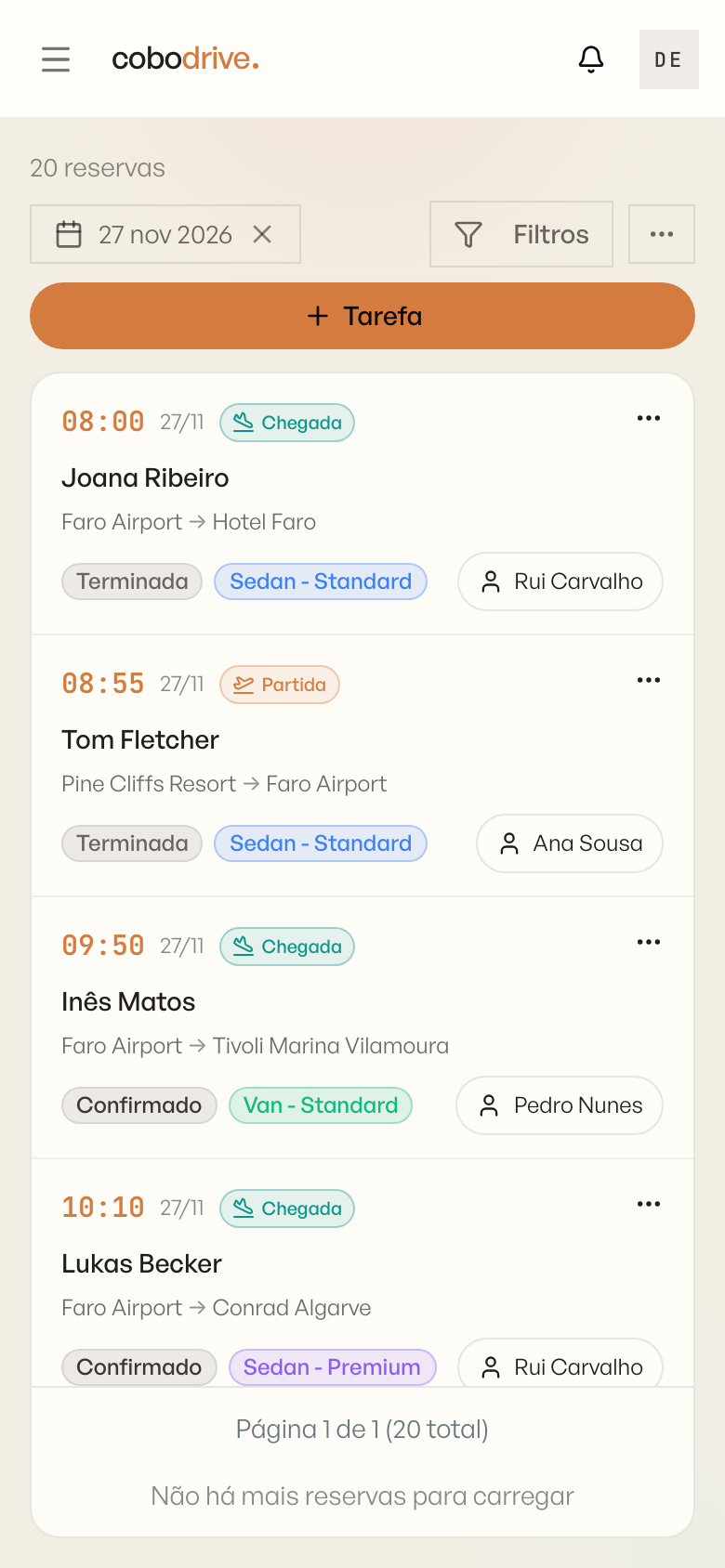
Where: Tasks list
v1.4.739 – v1.4.740
Tidier booking form and panel
In the booking form, «Operator» and «Vehicle class» are aligned and «Passengers» and «Luggage» sit side by side. On phones, the panel tabs fit in one scrollable line, fields no longer run off the screen, buttons use the full width and the «Time changed» note stays on one line.
Where: Dispatch › booking panel
v1.4.739
Fixed
Shifts in the company's time zone, and series that no longer pile up
Repeating shifts are created with the company's days and times, even close to midnight and after the clock change. Changing the time of a shift «in the series» no longer moves all future shifts onto the same day: each one keeps its day and gets the new time.
In the driver app, shift times follow the company's time zone (not the phone's), a shift can run past midnight («+1 day») and the end time responds again after changing the start. Shifts have no maximum length — an absence can last several days.
Ref. #342
v1.4.739 – v1.4.742
Set-password link always recoverable
Anyone who opened the invitation but never set a password only saw «invalid link», with no way out. The set-password page now has «Send new link»: enter the email and a fresh link arrives. The same applies to drivers, and the notice that someone became a driver includes a link to set a password when they don't have one yet.
Ref. #339
v1.4.736
Driver app: vehicle registration with large photos and documents
When registering a vehicle in the app, large photos and documents were rejected and the vehicle was never created. Files are now uploaded directly to storage, without that limit.
Ref. #340
v1.4.737
Driver app: oversized luggage in the task list
The app's task list now also receives oversized luggage (golf, bicycle…), which used to appear only when opening the details.
v1.4.738