
November 24, 2026
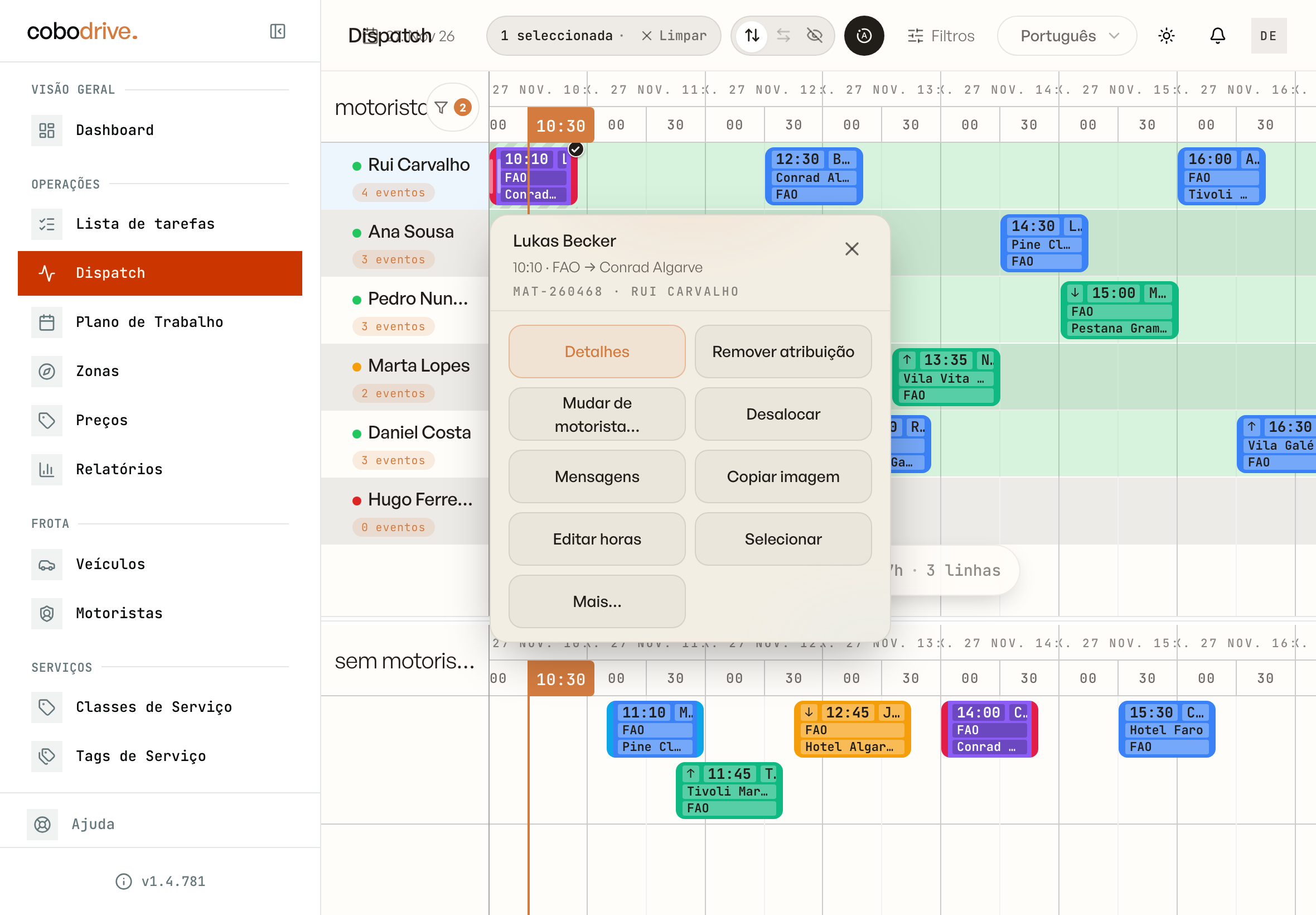
Dispatch took its first step towards working well on tablets: a tap on a task opens its actions, and changing times or selecting several tasks no longer needs a keyboard. In the booking form, «Swap» reverses origin and destination — together with «Duplicate task», it is the quickest way to create the return trip.
New
Dispatch on tablets: actions panel, «Edit times» and «Select»
On a tablet, a tap on a task (on the board or in the grid) opens the «Task actions» panel with a summary and large buttons: «Details», «Assign» / «Remove assignment», «Deallocate», «Messages», «Edit times», «Select» and «More…» (the full menu). With the panel open, tapping another task switches its content.
- Edit times — drag or stretch tasks in time without the Shift key; each change can be undone.
- Select — each tap marks or unmarks a task; a bar shows how many are selected and the bulk actions.
The screen also adapts: below 1024 px wide the «no driver» grid moves under the timeline; the Work Plan, Tasks list and Messages windows fit the screen (and open full screen on the smallest screens); dividers and buttons have larger touch targets. A long press no longer opens the menu in the middle of a drag or after scrolling.
Where: Dispatch (tablet)
Ref. #350
v1.4.758
«Swap» origin and destination — the return trip in two clicks
When creating a booking, duplicating it or creating a sub-task, the «Swap» button next to the destination reverses origin and destination. The Arrival/Departure direction follows automatically and the price is recalculated for the reverse direction (including the driver price), with a reminder to check the amount — zone-to-zone prices can differ in each direction.
To create the return of a trip: «Duplicate task», then «Swap», adjust the time and save.
When there is no price set for the route, the copied or hand-typed amount is no longer overwritten with zero.
Where: Booking form › Destination › Swap
Ref. #349, #280
v1.4.755
Company profile fields per country
Companies may have to provide licences and registrations specific to the country where they operate. When cobodrive defines those fields for the company's country, Settings shows the «Documents & licences» block with the fields to fill in; missing required fields are flagged. With no fields defined for the country, the block doesn't appear.
Where: Settings › General › Documents & licences
Ref. #319
v1.4.757
Fixed
Vehicles: the «Driver» column shows the drivers again
The «Driver» column in the vehicles list was always empty. It now shows the drivers linked to the vehicle (up to two names, the rest as «+N» with the full list on hover) and, with a green dot, who currently has the vehicle selected in the app («In the app»).
Where: Vehicles
Ref. #346
v1.4.756